

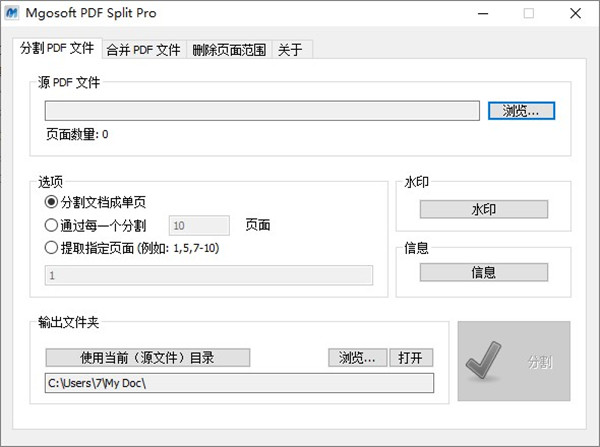
使用教程
1.安装好后,打开软件点击“Browse..”即可打开你要分割的PDF文档
2.在下面的“options”(选项)中你可以选择:
“split the document into single pages”(将文档拆分为单个页面),
“split by every ”(可以自行选择分成多个页面),
“extract specify pages”(提取指定页面)
3.然后选择保存位置即可点击“split”就可以进行拆分了
【指令详细介绍】
-i lt;stringgt; Specify input PDF file, Merge if more than one file.
-o lt;stringgt; Specify output folder or pdf file.
-l lt;stringgt; Specify log file for output message.
-w lt;stringgt; Set open PDF file password.
-s Split PDF file to PDF files, one page per PDF file.
-e lt;intgt; split PDF file by every n pages.
-d lt;stringgt; Delete specify pages.
===Text stamping===
-tt lt;stringgt; The content of the stamp.
-ts lt;intgt; Set the font size, default is 16 point.
-tc lt;intgt; Specify the text color,range from 0-16777215,default is 255(red).
-tp lt;intgt; The Position of stamps.
1 = Stamps on the Top-Left of the page. (default)
2 = Stamps on the Top-Center of the page.
3 = Stamps on the Top-Right of the page.
4 = Stamps on the Right-Center of the page.
5 = Stamps on the Right-Bottom of the page.
6 = Stamps on the Bottom-Center of the page.
7 = Stamps on the Left-Bottom of the page.
8 = Stamps on the Left-Center of the page.
9 = Stamps on the Center of the page.
-tr lt;intgt; The Angle for stamps,range from 0-360.
-tx lt;intgt; Offset from current position.
e.g -tx 10 Move to right 10 point
e.g -tx “-10” Move to left 10 point
功能介绍
1.独立程式 不需要Adobe Acrobat或Reader。
2.每n页或自定义页面范围拆分PDF文件。
3.从PDF文件中删除页面或页面范围。
4.据范围从PDF文件中提取页面。
5.将文件拆分成单页或一组页面;
6.保留各种注释;
7.支持“所有者”密码保护的PDF文件
8.支持“用户”密码保护的PDF文件(需要输入密码)
9.允许设置PDF元属性,如标题,作者,主题和关键字。




























共有 0条评论